
AI agent memory is what lets an agent carry something from one step, or one session, to the next. A language model on its own remembers nothing between calls. Whatever it seems to remember was put back into the prompt by your code. How you store and retrieve that material decides what the agent can recall, how quickly and at what cost per turn.
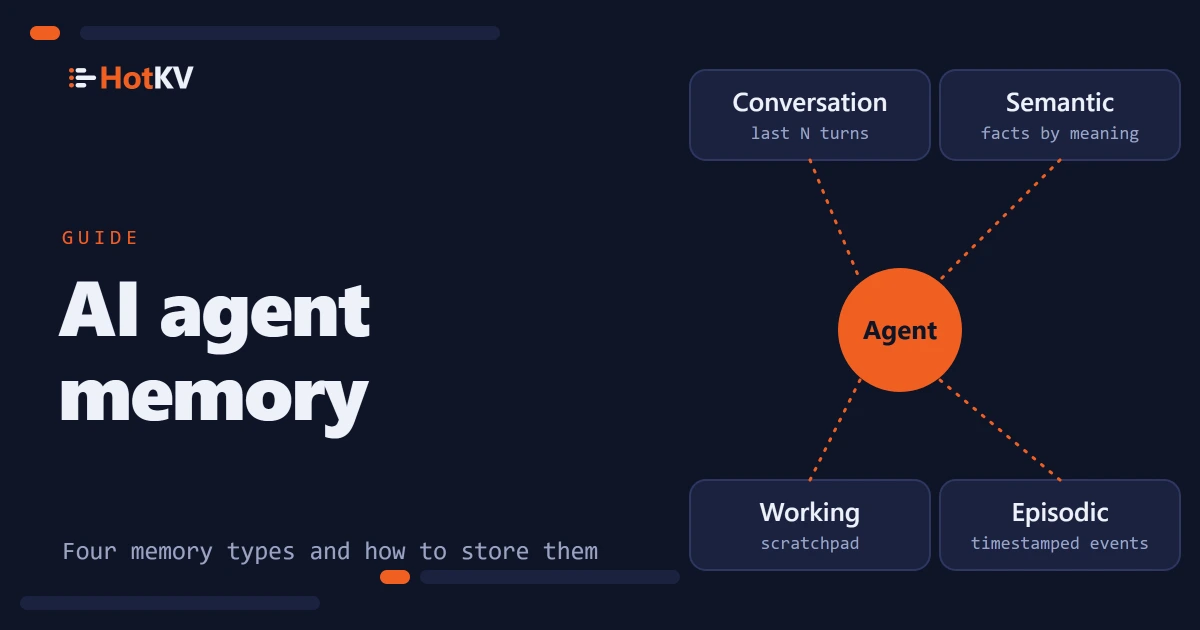
In short. Agents need four kinds of memory: a short conversation window, long-term facts found by meaning, a scratchpad for the task in progress, and a log of what happened. Each has a different shape, lifetime and lookup, so a single memory table fits none of them well. HotKV stores all four in one in-memory engine with the
AMEM.*commands. We have benchmarked HotKV's caching and vector search, not agent memory, so this article explains the design and claims no speed-up.
Why a context window is not memory
A context window is the text you send with each request. It has a size limit, you pay input tokens for everything in it every turn, and it disappears when the session ends. It also cannot be searched. If an agent needs one fact from three weeks ago, pasting the whole history is not an answer.
Memory is the layer that decides what goes into the window next. It keeps the recent turns and finds the few older facts that matter. It holds the state of the current task and records what the agent has done. Researchers describe agents in similar terms. The CoALA framework by Sumers, Yao, Narasimhan and Griffiths separates working memory from long-term episodic, semantic and procedural memory.
The four types of AI agent memory
HotKV's four stores cover most of the same ground, adapted to what an application has to build. Procedural memory, the know-how held in the agent's code and prompts, normally lives in your repository or a prompt registry and is not a store of its own.
Conversation memory
This is the short-term transcript of one session. Messages carry a role (system, user, assistant or tool). They sit in a bounded sliding window, so the oldest turns fall away once the limit is reached. It answers one question. What was said recently? In HotKV that is AMEM.CONV.CREATE, AMEM.CONV.APPEND and AMEM.CONV.WINDOW.
Semantic memory
Semantic memory is long-term knowledge stored as facts with an embedding vector. The agent recalls them by meaning, not by key. It is backed by an HNSW vector index, the same kind that powers vector search. AMEM.SEM.STORE saves a fact and AMEM.SEM.RECALL returns the top matches with a similarity score. This is where documents, user preferences and learned corrections belong.
Working memory
Working memory is the scratchpad for a task in progress, a flat set of keys and values scoped to a session. It holds the current step, the ticket being handled or a partial result. It should disappear when the task ends. AMEM.WORK.SET accepts a time to live for exactly that reason.
Episodic memory
Episodic memory is an append-only log of timestamped events, such as an action taken, an observation made or a decision reached. It lets an agent, or a person reviewing it, ask what happened and when. AMEM.EPIS.LOG writes an event and AMEM.EPIS.QUERY reads them back by type and time range.
AI agent memory in practice
Two things matter in practice. How you write to memory, and what you read back on each turn.
Storing memory with commands
Here is a support agent handling one conversation. The fictional policy text and the three-number vectors are only for illustration. A real embedding model produces vectors of 768 or 1,536 numbers, and you create the namespace with that dimension.
AMEM.CONV.CREATE session-42 WINDOW 50 TTL 86400
AMEM.CONV.APPEND session-42 user "My invoice shows the wrong VAT number."
AMEM.WORK.SET session-42 ticket "INV-1932" TTL 3600
AMEM.EPIS.LOG agent-support action "Looked up invoice INV-1932"

AMEM.SEM.CREATE support-kb 3
AMEM.SEM.STORE support-kb vat-policy "VAT details can be corrected within 30 days." 0.1 0.2 0.3
AMEM.SEM.RECALL support-kb 3 0.1 0.2 0.3
AMEM.CONV.WINDOW session-42 10
On each turn the agent reads the recent window and recalls the few facts that match the question. It checks its working note and builds the prompt from those pieces. After it acts, it logs the event. Nothing in that loop needs the whole history.
Reading memory on every turn
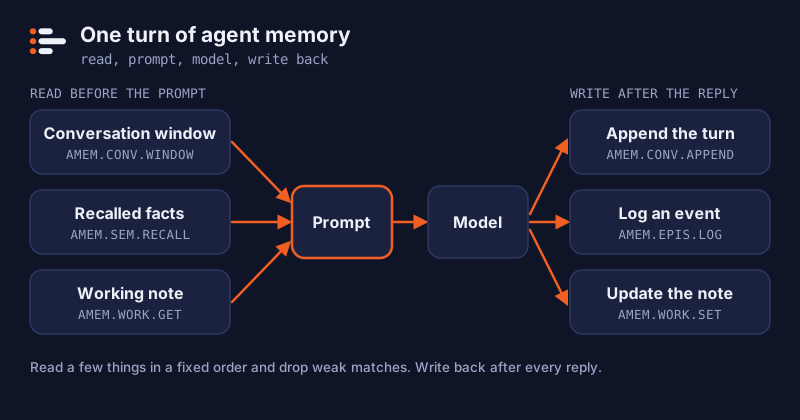
Storing memory is the easy half. The skill is deciding what to read back, because everything you read goes into the prompt and costs input tokens. A reasonable loop reads a handful of things in a fixed order. The recent turns come first, then the few facts that match the question, then the state of the task. Here it is with the official Python client, with your own embedding function and prompt template.
import hotkv

r = hotkv.from_url("hotkv://localhost:6379")
MIN_SIMILARITY = 0.8          # tune on your own data

def start_session(session: str) -> None:
    r.amem_conv_create(session, window=50, ttl=86400)   # create once, before the first append

def build_context(session: str, question: str) -> str:
    r.amem_conv_append(session, "user", question)
    turns = r.amem_conv_window(session, 10)
    facts = r.amem_sem_recall("support-kb", 3, embed(question))
    facts = [f for f in facts if f["similarity"] >= MIN_SIMILARITY]
    ticket = r.amem_work_get(session, "ticket")
    return render(turns, facts, ticket)      # your prompt template

def finish_turn(session: str, agent: str, reply: str) -> None:
    r.amem_conv_append(session, "assistant", reply)
    r.amem_epis_log(agent, "action", "Answered a billing question")
    r.amem_work_set(session, "last_step", "answered")
The cut-off on similarity is yours to tune. A value that suits one embedding model and one set of facts will be wrong for another, so check recall on questions you know the answers to. Dropping weak matches matters more than it looks, because a poor fact in the prompt is worse than no fact.
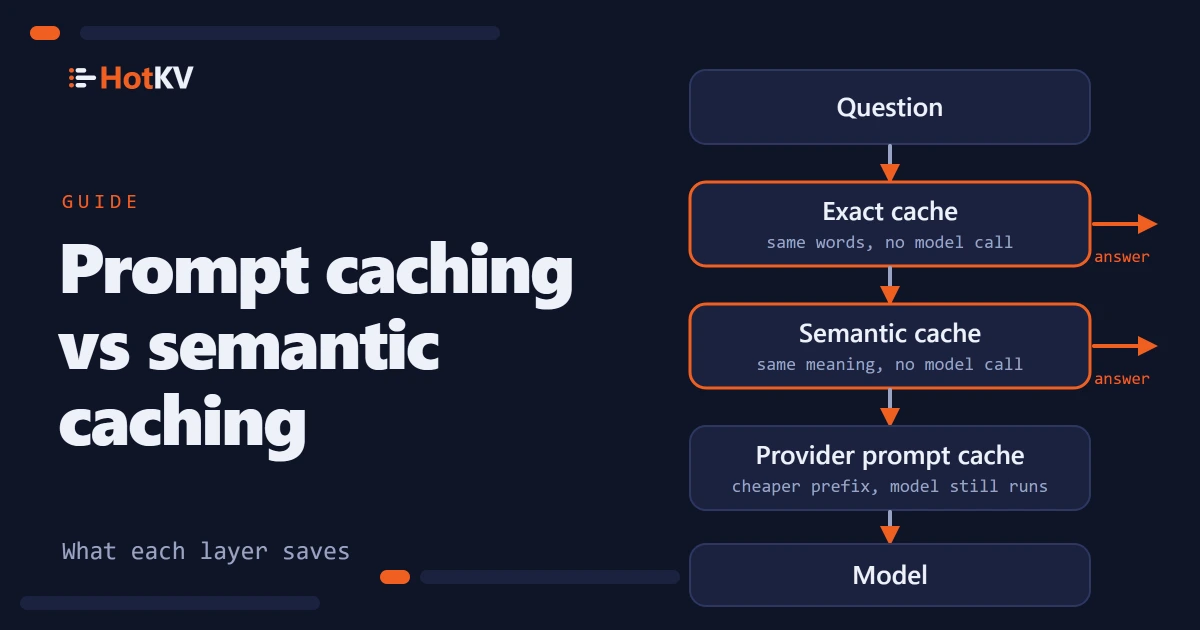
The stable parts of this prompt, such as the system instructions, are also the part that provider-side prompt caching makes cheaper. Put the memory you read at the end, after the stable text, so changing it does not invalidate that cache.
Summaries instead of ever-longer windows
A window drops old turns completely. That is fine for chit-chat and bad for a long task, where turn 3 may still matter at turn 300. A rolling summary is the usual answer. After each stretch of conversation the agent, or a cheaper model, writes down what has been learned, and the summary replaces the old turns in the prompt.
HotKV keeps one summary per agent with AMEM.SUMMARY.SET, AMEM.SUMMARY.APPEND and AMEM.SUMMARY.GET. SET replaces the text and APPEND adds a line. Every update raises a version number, so another component can tell cheaply that the summary changed and when.
A summary is lossy, and summarizing a summary loses more each time. Keep exact values such as identifiers, amounts and dates out of the prose and in working memory or semantic facts, where they survive. Use the summary for the shape of the work, such as preferences, decisions made and what remains.
Design rules and retention
Memory grows without limit unless you stop it, so set the limits before the first write.
Rules that keep memory useful
- Bound everything. Set a
WINDOWon conversations and aTTLon sessions and working values. For conversations, working values and facts, HotKV records the expiry time for the append-only file and replicas, so an entry that has expired does not come back when the file is replayed after a restart. - Store facts, not transcripts. Summarize before you write to semantic memory. A fact is easier to recall than a page of dialogue.
- Keep agents apart. Use a separate identifier or namespace per agent and per tenant, so one customer's memory is never recalled for another.
- Recall a few, not many. Take the top three to five matches and drop weak ones by similarity score before they enter the prompt.
- Keep secrets out. Memory is read back into prompts, so never store passwords, keys or data you would not show the model.
How long to keep each type
These lifetimes are our suggestions, not defaults. Pick yours from how fast the underlying facts change and what you are allowed to keep.
| Memory type | Suggested lifetime | Controls in HotKV |
|---|---|---|
| Conversation | The session, or a fixed period such as a day | WINDOW and TTL on AMEM.CONV.CREATE |
| Working | The task, then cleared | TTL on AMEM.WORK.SET, and AMEM.WORK.CLEAR |
| Semantic | Until the fact stops being true | TTL on AMEM.SEM.STORE, and AMEM.SEM.FORGET |
| Episodic | As long as your audit or support needs require | AMEM.EPIS.QUERY by time range, and AMEM.EPIS.CLEAR (events have no time to live) |
Retention is also a privacy question. If memory holds anything about a person, the lifetime you choose is part of what you promise them, so write it down.
How agent memory goes wrong
Most memory bugs are slow ones. The agent works well for a week and then starts getting worse. These are the failures to design against.
Common failures
- Stale facts. A fact that was true in March is recalled in October. Give facts a time to live, or store them under a key per entity so the new value overwrites the old one.
- Contradictions. Two stored facts disagree, and the agent picks one at random. Prefer one fact per key over appending new notes beside old ones.
- Over-recall. Too many matches fill the prompt with loosely related text. Recall few, and drop weak matches.
- Leaks between users. One customer's memory is recalled for another. Separate identifiers or namespaces for every tenant, checked in code before every read.
- Unbounded growth. Nothing ever expires, so lookups slow down and costs creep up. Every type needs a lifetime. Where HotKV has no time to live, as for the episodic log, schedule a clear or an export yourself.
- Summary drift. A summary of a summary slowly stops matching what happened. Keep the event log as the source of truth and regenerate summaries from it.
Treat stored text as untrusted
The last point deserves more attention. Anything an agent writes to memory can be read into a prompt later. That includes text that came from a web page, an email or a user. That is the indirect form of prompt injection that OWASP lists as LLM01. Store the source with each fact. Trust memory written from outside content less, and never let a recalled note override your system prompt.
What we have and have not measured
HotKV's published benchmarks cover command throughput, vector search and the token savings of response caching. Agent memory has no benchmark of its own yet. We make no claim about its latency or about how much it improves agent quality. What we can say is architectural. The four stores run in the same process as the cache and the vector index. A memory lookup is one call to a system you already operate.
The token savings benchmark and the comparison of prompt caching and semantic caching show the measured side. The agent memory use case shows the commands in a full scenario.
Using agent memory from Claude Code or Cursor
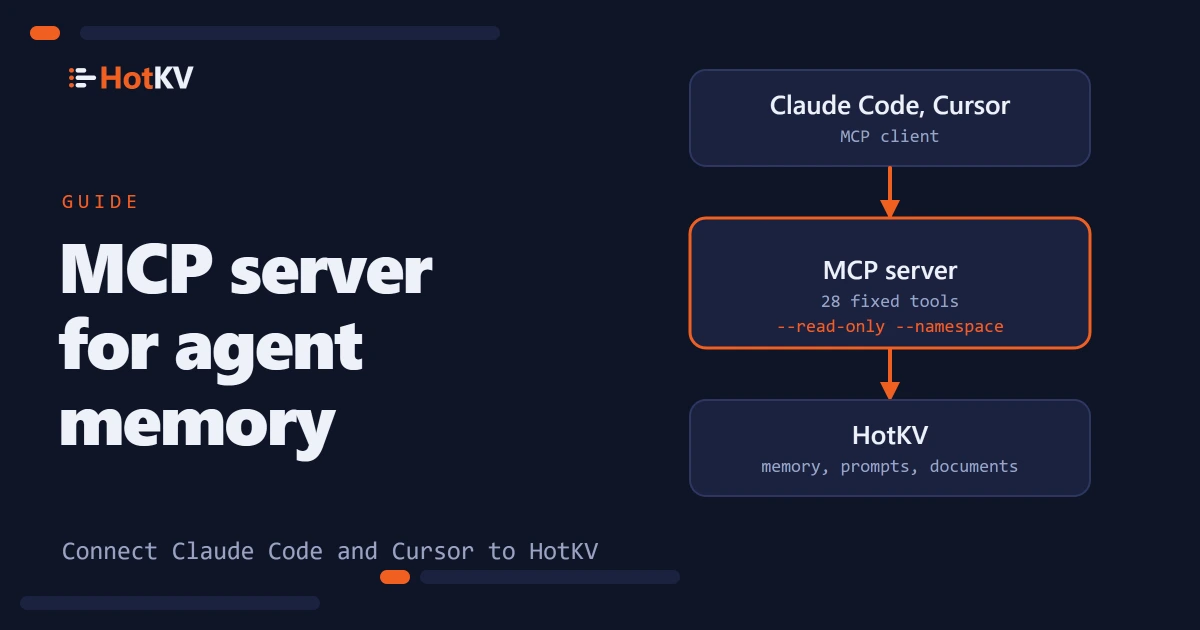
An assistant that supports the Model Context Protocol can use part of this memory without custom code. The open-source hotkv-mcp server exposes conversation memory, working notes, an event log and a rolling summary as tools. It has a read-only mode and a namespace that confines the agent. It does not expose semantic memory, and its tools cannot set a window or a time to live, so use the client library for those. The next article, an MCP server for agent memory, shows how to connect it and what its safeguards cover.
Frequently asked questions
What is AI agent memory?
AI agent memory is the storage and retrieval layer that lets an agent keep information across steps and sessions. It usually combines a recent conversation window, long-term facts found by meaning, a scratchpad for the current task and an event log.
What is the difference between short-term and long-term agent memory?
Short-term memory holds what is happening now, such as the recent turns and the task state, and is bounded and temporary. Long-term memory holds knowledge that should outlive a session, such as facts, preferences and past events, and is searched when needed.
What is a rolling summary in agent memory?
A rolling summary is a short running description of what an agent has learned or decided so far, updated as the work continues. It replaces old turns in the prompt so the prompt does not keep growing. HotKV stores one per agent and raises a version number on every update.
Do I need a vector database for agent memory?
Only for semantic memory, where facts are found by meaning. Conversation windows, working state and event logs need no vectors. HotKV keeps all four in one engine, so the vector index and the other stores are not separate systems.
How long should agent memory be kept?
It depends on the type. Working memory should expire when the task ends, conversations after the session or a set period, and episodic logs as long as your audit needs require. Facts in semantic memory should be reviewed and removed when they stop being true.
Can agent memory be attacked?
Yes. Text written to memory is later read into prompts, so a poisoned note can steer the agent. Record where each fact came from, trust outside content less, and keep recalled memory below your system prompt in authority.
Does HotKV store agent memory in RAM?
HotKV is an in-memory engine, so reads are served from memory. Writes to the four stores are recorded for the append-only file and for replicas, with expiry times carried through, according to the product documentation.
Continue the conversation
Comments
Questions about the method? A different result on your hardware? Share what you found. Comments are reviewed before they appear.