
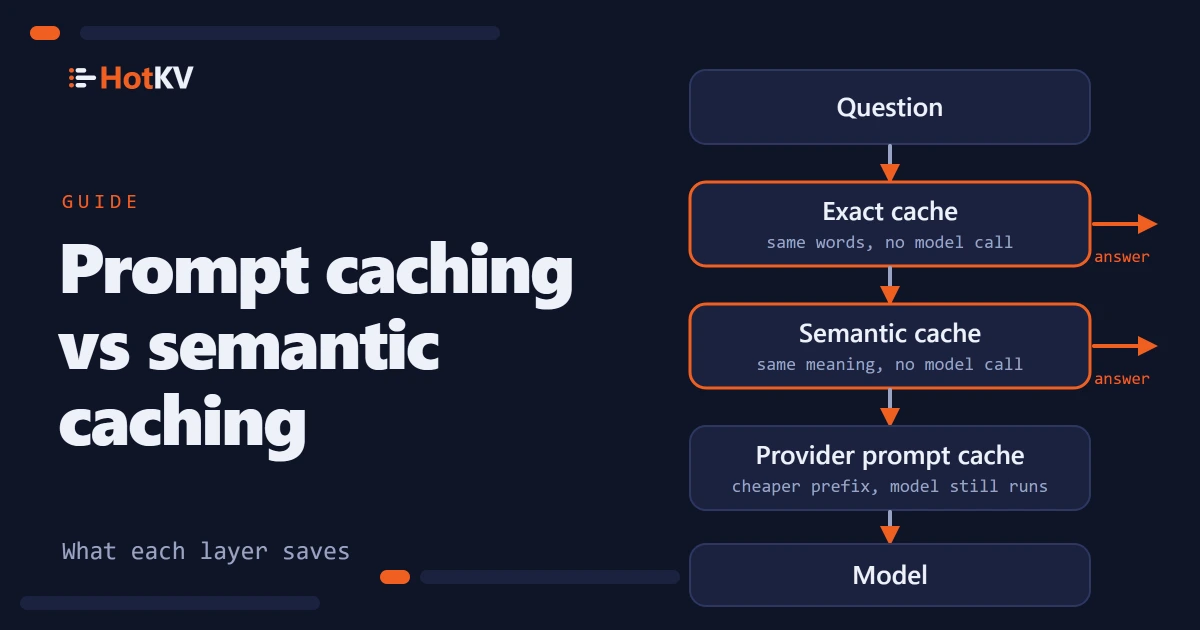
Two different things are sold as caching for language models, and teams regularly buy one expecting the other. Prompt caching is a provider feature that makes a repeated prompt prefix cheaper to read. Semantic caching is a layer you run yourself that answers a question from memory so the model is never called. They solve different halves of the bill, and they work best together.
In short. Prompt caching discounts the repeated start of a prompt, such as a long system prompt, but the model still runs and you still pay for every output token. Exact and semantic caching remove the call entirely when a question has been answered before. In our 3,000-request benchmark with the provider's prompt caching already on, adding HotKV in front cut model calls, tokens and cost by about 70%, because output tokens were still 73% to 92% of the baseline cost.
How prompt caching works
Prompt caching lives at the model provider. You mark the stable start of a request, usually the tools and the system prompt, and the provider stores its processed form for a short time. The next request that begins with the identical text is billed at a reduced rate for that part. We describe Anthropic's version here because it is the one we measured. The details below come from its prompt caching documentation, checked on 18 October 2026.
What gets cached
A hit needs an exact match. Every block up to and including the one you marked with cache_control must be identical, in the order tools, system prompt, then messages. Change one character early in the prompt and everything after it is a miss. The question itself comes last, so it is never part of the cached prefix.
Prompts below a minimum length are not cached and no error is returned. For the current Claude models we used, Fable 5.1, Opus 5.5, Sonnet 5.5 and Haiku 5.5, the documented minimum is 512 tokens. Cache entries are isolated per organization, and per workspace on the Claude API.
What it costs
The default lifetime is five minutes, and each use of the entry refreshes it at no extra charge. A one-hour lifetime is available. Writing an entry costs 1.25 times the base input price for five minutes and 2 times for one hour. Reading it costs 0.1 times the base input price on most models, 0.05 times on Opus 5.5 and Sonnet 5.5, and 0.025 times on Fable 5.1, according to the pricing page. Those multipliers change, so read the current page before you do any arithmetic.
What prompt caching cannot remove
Prompt caching discounts reading the prefix. It does not skip the model. Each request still produces a fresh answer, you still wait for it, and every output token is billed at the full output price.
Our benchmark shows how much that matters. We sent 3,000 customer support questions to each of four Claude models with a 2,200-token policy as the system prompt and provider caching on. Between 90% and 93% of the tokens counted were cache reads of that policy. Output was only 6% to 9% of the tokens, yet it was 73% to 92% of the baseline cost. The prefix was already cheap, so the remaining spend sat in the answers.
That is the gap the other layers fill. The full method and results are in the token savings benchmark.
Exact and semantic response caching
Two layers answer a request from memory. They differ in how they decide that a new request matches an old one.
Exact response caching
An exact cache stores the final answer under a key built from everything that shapes it. Normally that is the model, the prompt version and the normalized question. When the same request arrives again the stored answer is returned and the model is not called. There is no similarity score and no risk of returning an answer meant for a different question.
In our run, the exact cache answered about 39% of requests. A repeated question came back in a median of about 0.05 ms. That was measured with a Python client over loopback on the same machine, so read it as a local figure and not a network one. The benchmark used plain GET and SET for this layer. HotKV Enterprise also has a dedicated exact-match prompt cache, PCACHE.*, with per-namespace limits and cost tracking.
Exact caching is blind to wording. "How do I reset my password?" and "I forgot my password" are two different keys.
Semantic caching
A semantic cache looks up the meaning of the question. It turns the question into an embedding, finds the nearest stored question and returns its answer if the cosine similarity clears a threshold. In HotKV that is SCACHE.*, built on the same vector index as vector search.
About 31% of our requests were answered this way. A paraphrase took a median of about 130 ms, almost all of it the call to the embedding service, so a semantic hit is much faster than a model call but not instant. Without the semantic layer, an exact cache alone would have needed at most 1,264 model calls out of 3,000, about 58% fewer. The semantic layer took the saving to about 70%.
It is also where the risk lives. A similar question is not always the same question. We had a second Claude model judge every semantic hit against a fresh answer. At our default threshold of 0.81, cached answers fit the exact question 5.8 to 10.7 percentage points less often than fresh ones. On Sonnet 5.5, thresholds of 0.88 and above showed no such deficit, with thin evidence. Questions written to differ by one decisive detail still matched 62% of the time at 0.81 and 10% at 0.95.
Prompt caching vs semantic caching side by side
| Provider prompt caching | Exact response cache | Semantic cache | |
|---|---|---|---|
| What it removes | Part of the input price | The whole model call | The whole model call |
| Match rule | Identical prefix | Identical request | Similar meaning above a threshold |
| Output tokens billed | Yes, every time | No, on a hit | No, on a hit |
| Wrong-answer risk | None | None for identical requests | Real, tuned by the threshold |
| Runs where | At the provider | In your cache | In your cache, plus an embedding call |
| Share of requests in our run | Always on | About 39% | About 31% |
Provider prompt caching and response caching are not alternatives. One reduces the price of the calls you still make, and the other reduces how many calls you make.
What caching does to latency
Skipping the model changes how fast answers arrive as well as what they cost. In our run the median time to a complete answer fell from 2.7 seconds to 127 ms on Fable 5.1, from 2.9 seconds to 126 ms on Opus 5.5, from 1.8 seconds to 128 ms on Sonnet 5.5 and from 1.4 seconds to 125 ms on Haiku 5.5. That is 11 to 23 times faster at the median.
The slow end barely moved. About 30% of requests still reached the model, and the 99th percentile on Fable 5.1 was about 6.4 seconds with HotKV against 6.6 seconds without it. A cache removes the waiting for the requests it answers and does nothing for the ones it misses. If your complaint is a slow worst case rather than a slow typical case, caching alone will not fix it.
These are times to the complete answer, because the calls were not streamed. A streamed answer shows its first words sooner. The gap in a chat window is smaller than the gap in these numbers.
Choosing a layer for your traffic
The right layer depends on how your requests repeat, and you can measure that before you build anything.
Match the layer to the traffic
Match the layer to how your requests repeat.
- A long, stable system prompt or tool list: use provider prompt caching. It costs little to turn on and changes no answers.
- The same question in the same words, such as a button, a template or a retry: use an exact response cache. It is safe and fast.
- Support, search and FAQ traffic where people ask the same thing in different words: add a semantic cache, set the threshold high, and check answer quality on your own questions before you trust it.
- Answers that depend on the user, the clock or live data: cache none of them, or key the cache on the facts that change the answer.
Savings follow repetition. When we made every intent equally likely instead of skewed, cost fell 56% on the two models we reran, and with 3,000 all-different questions it fell 38%. A workload with no repeated or similar questions saves nothing.
Measure your own repetition first
Before you build anything, find out how much of your traffic repeats. The number decides whether an exact cache is worth having. It takes ten minutes with the questions you already log. Normalize each question the way your cache key will, count the distinct ones, and see how much of the traffic was a repeat.
from collections import Counter

def normalise(question: str) -> str:
    return " ".join(question.lower().split())

counts = Counter(normalise(q) for q in logged_questions)
repeat_share = 1 - len(counts) / sum(counts.values())
repeat_share is the fraction of requests an exact cache would have answered, once it had seen each question a first time. Our test set had 1,264 distinct questions among 3,000 requests, so the figure was about 58%. If yours comes out near 5%, an exact cache will do little, and only a semantic layer can help.
Two cautions apply. A cache starts empty, so the early requests always reach the model. In our run about 52% of the first thousand requests were served from the cache and about 81% of the last thousand. And a log of last month's traffic tells you about last month. If you are about to launch a feature that changes what people ask, treat the figure as a rough guide.
Putting the layers together
A request should pass through the layers from the cheapest and safest to the most expensive, and you should be able to see what each one saved.
The lookup order
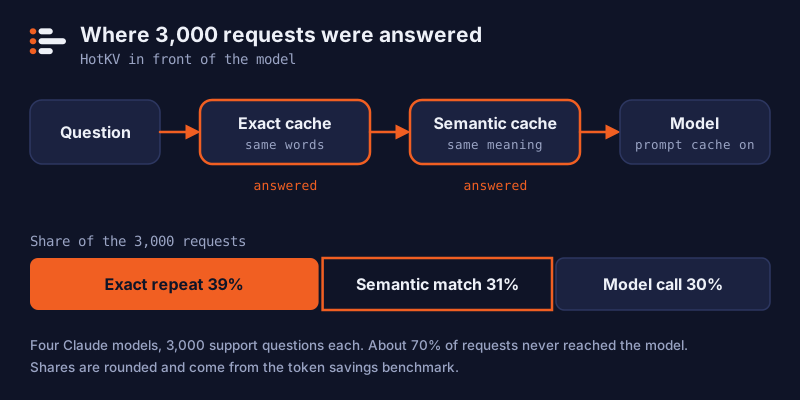
The order matters. Check the cheapest and safest layer first and call the model only when everything misses. This sketch assumes a redis-py style client with decode_responses=True, two namespaces created beforehand, and your own embed and llm functions.
def answer(question: str) -> str:
    if hit := r.execute_command("PCACHE.GET", "answers_exact", question):
        return hit                                   # same words

    vector = embed(question)
    hit = r.execute_command("SCACHE.GET", "answers_semantic", *vector, "THRESHOLD", 0.90)
    if hit:
        return hit[0]                                # same meaning

    reply = llm.complete(question)                   # provider prompt caching applies here
    r.execute_command("PCACHE.SET", "answers_exact", question, reply, "TTL", 3600)
    r.execute_command("SCACHE.SET", "answers_semantic", question, reply, *vector, "TTL", 3600)
    return reply
Create the namespaces once with PCACHE.CREATE answers_exact and SCACHE.CREATE answers_semantic 1536 THRESHOLD 0.90, using your embedding model's dimension. The AI command set comes with HotKV Cloud Performance and Scale instances, and the AI page lists what each engine does. The pricing page shows which plan includes what.
Keeping score in production
A cache you cannot see is a cache you cannot trust. HotKV keeps hit and miss counts per namespace. If you store the original call's token usage with each entry, it can also attribute the tokens and cost that every later hit avoided. The PCACHE.STATS and SCACHE.STATS replies then carry fields such as usage_saved_requests, usage_saved_input_tokens and usage_saved_cost_usd.
PCACHE.SET answers_exact "How do I reset my password?" "Open Settings ..." MODEL <model> INPUT 100 OUTPUT 180 CACHEREAD 2200
Replace <model> with your model's id. INPUT counts the uncached prompt tokens and CACHEREAD the tokens the provider served from its own cache, so the two do not overlap. The model must be in HotKV's price table for the cost field to mean anything. LLMSTATS.PRICE LIST shows which models are known, and LLMSTATS.PRICE SET adds your own. A model with no price still has its tokens counted, but its cost is recorded as zero and a separate counter shows that requests went unpriced.
Caches reduce spend, and a budget caps what is left. LLMBUDGET.SET defines a token and dollar limit over a time window. LLMBUDGET.CONSUME is checked before the model call, so a runaway agent is stopped before it spends the money, not after. LLMSTATS.RECORD keeps per-tenant totals that understand the provider's cache-read and cache-write tokens. All three use one price table when you pass the model name, so a saving, a budget and a dashboard figure cannot disagree.
Mistakes that make a cache return wrong answers
Most bad cache hits come from a key that is missing something. Put the model, the prompt version and any tool or policy version into the exact key, so a prompt change cannot serve answers written for the old one.
Give entries a lifetime that matches how fast your facts change. Keep tenants apart with separate namespaces so one customer's answer is never offered to another. Never cache an answer that contains personal data unless the key includes whose data it is.
Finally, measure on your own traffic. Our figures come from one public dataset of short banking questions, a fictional policy and one run per condition, and they are not a promise for your workload.
Frequently asked questions
What is prompt caching?
Prompt caching is a model provider feature that stores the processed start of a prompt for a short time. A later request that begins with exactly the same text is billed at a lower rate for that part. The model still runs and produces a new answer, so you still pay for output tokens.
Is prompt caching the same as semantic caching?
No. Prompt caching reuses a repeated prompt prefix and still calls the model. Semantic caching returns a stored answer to a question with a similar meaning and skips the model call. They address different costs and can be used together.
Does prompt caching reduce output token costs?
No. It only lowers the price of reading the cached prefix. In our benchmark, output was 6% to 9% of the tokens but 73% to 92% of the baseline cost with prompt caching already on, which is why caching whole answers saved far more.
How long does Anthropic's prompt cache last?
The default is five minutes, refreshed each time the entry is used. A one-hour option is available at a higher write price. Check the current documentation, because limits and prices change.
Can I use prompt caching and semantic caching together?
Yes, and our benchmark did exactly that. Provider prompt caching stayed on in both runs, and the semantic and exact layers sat in front of the model. Cache hits skip the call, and misses still benefit from the discounted prefix.
What similarity threshold should a semantic cache use?
There is no universal value. We chose 0.81 on a separate training split, and on Sonnet 5.5 cached answers showed no quality deficit against fresh ones from 0.88 upward, with thin evidence. Start high, judge cached answers against fresh ones on your own questions, and lower the threshold only if quality holds.
Continue the conversation
Comments
Questions about the method? A different result on your hardware? Share what you found. Comments are reviewed before they appear.